New Reclaim your BC database
SharePoint Connector
for Business Central.
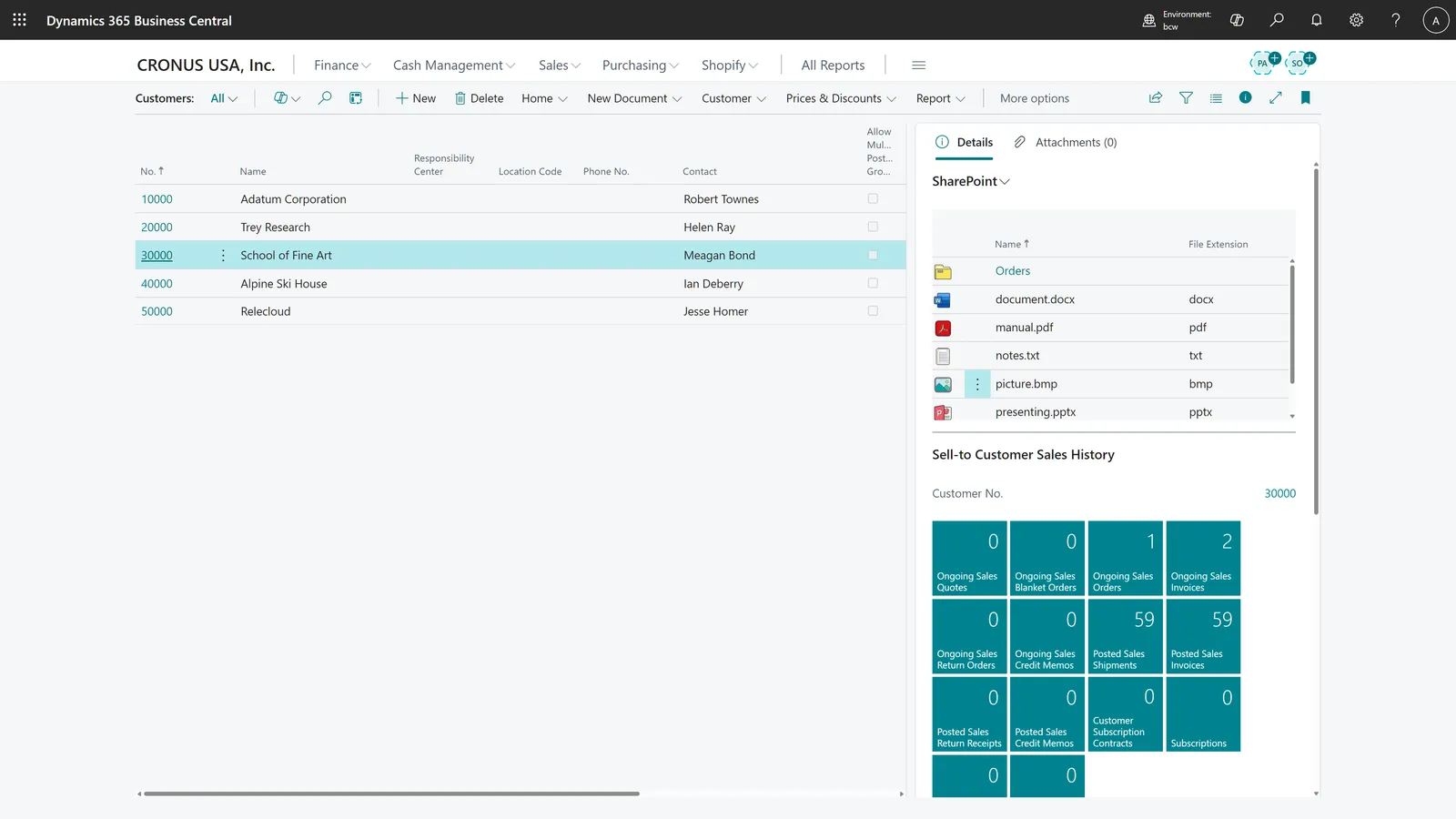
One extension. Fifteen minutes. Your attachments move to SharePoint — your team still works in Business Central exactly like before.
AppSource rating
5.0★
1 review · 5 stars
All files in SharePoint synced · 2 min ago
How it works
Live by lunch.
- 1Install from AppSourceOne-click install into your BC environment.
- 2Run guided setupWizard walks you through every field.
- 3Authenticate with Microsoft Entra IDStandard Microsoft Entra ID auth flow.
- 4Pick what auto-transfersChoose doc types and folder shape.
- 5Upload a test docConfirm it lands in SharePoint.
What's in the box
Six capabilities.
No filler.
01 · Setup
Guided setup wizard.
Step-by-step prompts walk an admin through every field — no developer and no BC partner call.
Step 3 / 5 ● configuring
Authenticate with Microsoft Entra ID →
Why teams use it
BC was never meant to be a file cabinet.
SharePoint already comes with your Microsoft 365 license. Use it for what it's good at — storage and collaboration — and let Business Central do what it's good at.
Keeps the BC database small
Move PDFs out of SQL where they're expensive.
Cheaper, more flexible storage
Pay for SharePoint once. Use it everywhere.
Zero technical experience required
No developer, no partner involvement.
60
Countries available
Live on Microsoft AppSource worldwide.
$0
Setup fee, ever
Direct from AppSource. No consultant retainer.
15min
End-to-end setup
From "install" to a working sync.
1-click
Uninstall & revert
Files stay in your SharePoint. Always yours.
Common questions
The questions BC admins ask first.
What we hear most often from BC admins and consultants before installing the connector.
Last updated
01 Where do my files actually live — in your tenant or mine?
01 Where do my files actually live — in your tenant or mine?
Your files live exclusively in your own Microsoft 365 SharePoint tenant. The Business Central SharePoint Connector never copies, mirrors, or stores documents on our infrastructure. Authentication uses your existing Microsoft Entra ID credentials; we only hold the configuration metadata required to route files from BC to your SharePoint site.
02 How do I move Business Central attachments to SharePoint?
02 How do I move Business Central attachments to SharePoint?
Install the SharePoint Connector from Microsoft AppSource into your Business Central environment, run the guided setup wizard, enter your SharePoint site URL, authenticate with Microsoft Entra ID, and choose which document types should transfer automatically. End-to-end setup takes about 15 minutes and requires no developer or BC partner involvement.
03 What happens to attachments that are already in my BC database?
03 What happens to attachments that are already in my BC database?
Existing attachments stay in place by default — nothing is moved without you. New uploads after install route straight to SharePoint. To transfer older attachments, you can use the built-in attachment transfer functionality.
04 Does it work with Business Central SaaS, on-premises, and hybrid?
04 Does it work with Business Central SaaS, on-premises, and hybrid?
The SharePoint Connector targets Business Central 2025 release wave 1 (v26.1) and later. It's built for BC SaaS (cloud); on-premises and hybrid deployments work too, as long as the BC environment can reach Microsoft 365 / SharePoint over HTTPS.
05 What does it cost after the free trial?
05 What does it cost after the free trial?
Your first month is free. After that it's a per-user subscription, billed monthly or annually, with tiers based on team size — from €5/user/month for larger teams up to €10/user/month for the smallest. The full plan breakdown is on the Microsoft AppSource listing. There's no setup fee, and you can cancel from the AppSource portal anytime.
06 Can I uninstall it and revert to BC-native attachments?
06 Can I uninstall it and revert to BC-native attachments?
Yes. Uninstall the extension from Business Central and keep using BC-native attachments. Files already moved to SharePoint remain accessible in SharePoint.
07 Why is my Business Central database so large?
07 Why is my Business Central database so large?
In most BC tenants, the largest single storage consumer is the Incoming Document and Document Attachment tables. Each PDF invoice, signed contract, or scanned receipt is stored as a BLOB inside the SQL database. Once these accumulate, BC storage costs rise and backup/restore times degrade. Because attachments are usually the single largest consumer of that space, moving them to SharePoint is one of the most effective ways to shrink a Business Central database.
Source: Microsoft Learn — Managing capacity ↗
08 Where does Business Central store attachments by default?
08 Where does Business Central store attachments by default?
By default, Business Central stores file attachments as binary BLOBs inside its SQL database — specifically in tables linked to records like Sales Invoices, Purchase Invoices, Items, and Customers. This is convenient for retrieval but expensive to scale: BC storage is metered in gigabytes, and database size affects both subscription cost and operational performance.
Source: Microsoft Learn — BLOB data type ↗
09 Do I need a BC partner or developer to install this?
09 Do I need a BC partner or developer to install this?
No developer or BC partner is needed. A BC administrator installs the extension from AppSource in one click. Connecting to SharePoint needs a one-time Microsoft Entra app registration and admin consent — the guided wizard walks you through it step by step. We provide support if you get stuck — see the contact link below.
Ready when you are
Smaller database.
Same Business Central.
Free for your first month on Microsoft AppSource. Uninstall any time — your files stay safely in your SharePoint.